Adrian Salisbury – Pro Studio Formula is a step-by-step training program designed to help creators, coaches, entrepreneurs, and online business owners build a professional-looking home studio for video content, online courses, webinars, meetings, and YouTube videos — without spending thousands on complicated equipment.
The course simplifies the process of improving on-camera appearance, lighting, framing, audio, and studio backgrounds so anyone can create professional-quality videos from home.
What Is Pro Studio Formula?
This program focuses on one core goal:
Helping creators look professional on camera quickly and affordably.
Instead of overwhelming students with highly technical filmmaking concepts, Adrian Salisbury teaches a simplified system focused on the visual elements that actually matter most:
- Camera setup
- Lighting
- Background design
- Audio quality
- Framing
- Home studio optimization
The training is based on Adrian’s experience creating over 700 videos and generating millions of YouTube views through professional-quality video production.
What You’ll Learn
Inside Pro Studio Formula, you’ll learn how to:
- Build a professional home studio
- Improve video quality
- Look more credible on camera
- Create engaging video backgrounds
- Use lighting effectively
- Set up cameras correctly
- Improve audio quality
- Shoot high-quality videos with simple equipment
- Optimize Zoom & livestream appearance
- Create vertical content for social media
Included Modules
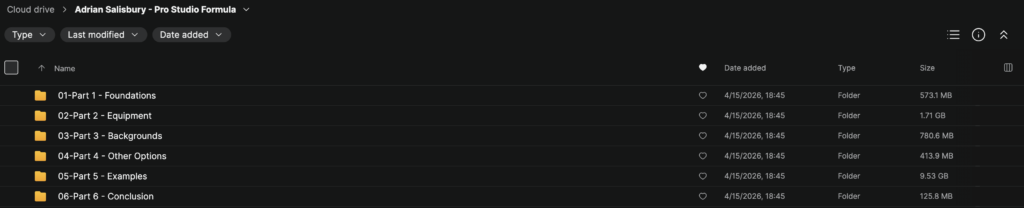
Part 1 – Foundations
Learn the core principles behind building a professional home studio.
Topics include:
- Home studio planning
- Choosing your visual style
- Understanding professional video aesthetics
- Setting up for your brand
- Creating a strong first impression
Part 2 – Equipment
This section covers the tools and equipment needed to improve video quality.
Topics include:
- Camera recommendations
- Mirrorless camera setups
- Phone camera optimization
- Lens selection
- Microphone recommendations
- Lighting gear
- Budget-friendly setups
Part 3 – Backgrounds
Learn how to create attractive and professional-looking backgrounds.
Topics include:
- Background composition
- Prop placement
- Lighting backgrounds
- Minimalist studio design
- Professional Zoom setups
- Improving depth & aesthetics
Part 4 – Other Options
Additional studio solutions and alternative setups.
Topics include:
- Flexible room setups
- Multi-purpose spaces
- Small room optimization
- Simple creator setups
- Temporary studio arrangements
Part 5 – Examples
One of the most practical sections of the course.
Includes multiple real-world studio examples showing:
- Guest bedroom studios
- Office setups
- Lounge room studios
- Minimal-space environments
- Bright & dark studio styles
- Cluttered room transformations
Students can follow along and recreate similar setups.
Part 6 – Conclusion
Final recommendations and implementation guidance.
Topics include:
- Studio refinement
- Workflow optimization
- Next steps
- Content creation consistency
- Long-term improvements
Key Topics Covered
Camera Setup
Learn how to:
- Position cameras correctly
- Frame shots professionally
- Improve image quality
- Create a cinematic-looking video
Lighting
The course explains:
- Key lighting zones
- Affordable lighting setups
- Natural vs artificial lighting
- Professional lighting aesthetics
- How to avoid flat-looking video
Audio Quality
Topics include:
- Microphone selection
- Desk setups
- Wireless solutions
- Clear voice recording
- Improving professionalism through audio
Studio Design
Learn how to:
- Design visually appealing backgrounds
- Use props effectively
- Create depth in your scene
- Make small spaces look premium
Social Media Video
The training also covers:
- Vertical video setups
- Reels & Shorts optimization
- Livestream presentation
- Webinar & Zoom appearance
Bonus Features
Gear Recommendations
Includes recommended equipment lists for:
- Different budgets
- Camera systems
- Audio setups
- Lighting gear
- Accessories
Real Studio Examples
7 complete studio build examples demonstrating:
- Small room setups
- Professional creator studios
- Flexible room transformations
- Different aesthetic styles
What Makes This Course Different?
Pro Studio Formula focuses on practical improvements that most viewers immediately notice:
✅ Better lighting
✅ Cleaner framing
✅ Professional backgrounds
✅ Stronger credibility
✅ Better first impressions
✅ Simple affordable setups
✅ Easy implementation
The course removes unnecessary complexity and focuses on helping creators look more professional quickly.
Who This Course Is For
This training is ideal for:
- YouTubers
- Coaches
- Course creators
- Online educators
- Consultants
- Webinar hosts
- Entrepreneurs
- Personal brands
- Livestreamers
- Social media creators
Especially useful for creators who:
- feel embarrassed by their setup
- want better video quality
- need affordable solutions
- want to improve authority online
Main Benefits
Students can use this training to:
- Improve video quality
- Build credibility online
- Create professional content
- Stand out visually
- Improve Zoom appearance
- Increase viewer trust
- Build stronger personal brands
- Create better online courses
- Produce higher-quality YouTube videos
Course Highlights
The course includes:
- Step-by-step training videos
- Equipment guidance
- Studio setup examples
- Lighting tutorials
- Background design lessons
- Social media optimization
- Camera setup walkthroughs
Final Thoughts
Adrian Salisbury – Pro Studio Formula is a practical home studio training designed to help creators dramatically improve how they look on camera without overcomplicating the process or spending a fortune on gear.
If you want to improve your on-camera presence, create higher-quality videos, and elevate your personal brand online, this course offers a clear and beginner-friendly roadmap.
Get Pro Studio Formula by Adrian Salisbury today.